Key features (at a glance)
- High throughput / low latency: focused on very fast token output and quick completions for IDE use.
- Agentic function-calling & tooling: supports function calls and external tool orchestration (run tests, linters, file fetch) to enable multi-step coding agents.
- Large context window: designed to handle large codebases and multi-file contexts (providers list 256k context windows in marketplace adapters).
- Visible reasoning / traces: responses can include stepwise reasoning traces intended to make agent decisions inspectable and debuggable.
Technical details
Architecture & training: Grok Code Fast 1 was built from scratch with a new architecture and a pre-training corpus rich in programming content; the model then received post-training curation on high-quality, real-world pull-request / code datasets. This engineering pipeline is targeted to make the model practical inside agentic workflows (IDE + tool use).
Serving & context: Grok Code Fast 1 and typical usage patterns assume streaming outputs, function calls, and rich context injection (file uploads/collections). Several cloud marketplaces and platform adapters already list it with large context support ( 256k contexts in some adapters).
Usability features: Visible reasoning traces (the model surfaces its planning/tool usage), prompt-engineering guidance and example integrations, and early launch partner integrations (e.g., GitHub Copilot, Cursor).
Benchmark performance (what it scores on)
SWE-Bench-Verified: xAI reports a 70.8% score on their internal harness over the SWE-Bench-Verified subset — a benchmark commonly used for software-engineering model comparisons. A recent hands-on evaluation reported an average human rating ≈ 7.6 on a mixed coding suite — competitive with some high-value models (e.g., Gemini 2.5 Pro) but trailing larger multimodal/“best-reasoner” models such as Claude Opus 4 and xAI’s own Grok 4 on high-difficulty reasoning tasks. Benchmarks also show variance by task: excellent for common bug fixes and concise code generation, weaker on some niche or library-specific problems (Tailwind CSS example).
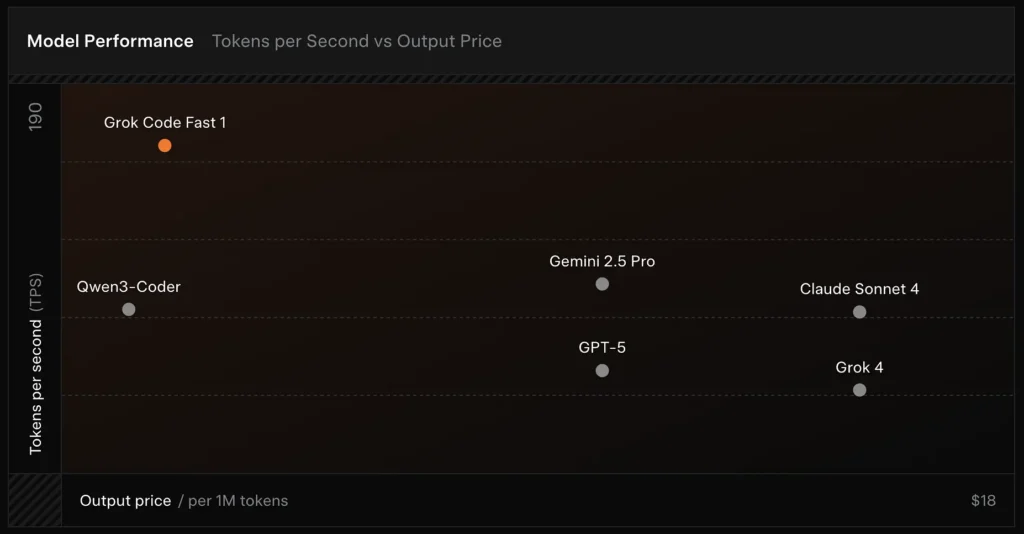
Comparison :
- vs Grok 4: Grok Code Fast 1 trades some absolute correctness and deeper reasoning for much lower cost and faster throughput; Grok 4 remains the higher-capability option.
- vs Claude Opus / GPT-class: Those models often lead on complex, creative, or hard reasoning tasks; Grok Code Fast 1 competes well on high-volume, routine developer tasks where latency and cost matter.
Limitations & risks
Practical limitations observed so far:
- Domain gaps: performance dips on niche libraries or unusually framed problems (examples include Tailwind CSS edge cases).
- Reasoning-token cost tradeoff: because the model can emit internal reasoning tokens, highly agentic/verbose reasoning can increase inference output length (and cost).
- Accuracy / edge cases: while strong on routine tasks, Grok Code Fast 1 can hallucinate or produce incorrect code for novel algorithms or adversarial problem statements; it may underperform top reasoning-focused models on demanding algorithmic benchmarks.
Typical use cases
- IDE assistance & rapid prototyping: fast completions, incremental code writes, and interactive debugging.
- Automated agents / code workflows: agents that orchestrate tests, run commands, and edit files (e.g., CI helpers, bot reviewers).
- Day-to-day engineering tasks: generating code skeletons, refactors, bug triage suggestions, and multi-file project scaffolding where low latency materially improves developer flow.
- How to access Grok Code Fast 1 API
Step 1: Sign Up for API Key
Log in to cometapi.com. If you are not our user yet, please register first. Sign into your CometAPI console. Get the access credential API key of the interface. Click “Add Token” at the API token in the personal center, get the token key: sk-xxxxx and submit.
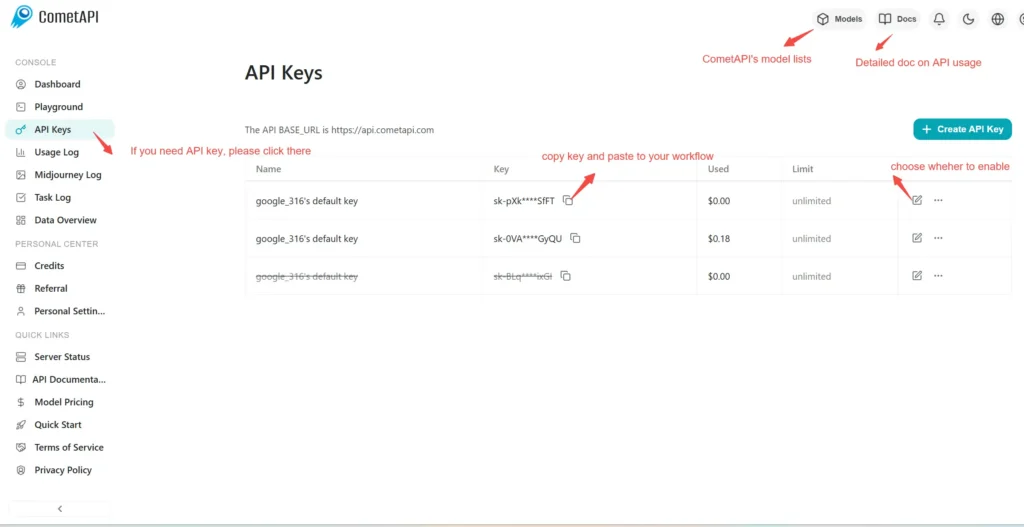
Step 2: Send Requests to Grok Code Fast 1 API
Select the “\grok-code-fast-1\” endpoint to send the API request and set the request body. The request method and request body are obtained from our website API doc. Our website also provides Apifox test for your convenience. Replace <YOUR_API_KEY> with your actual CometAPI key from your account. base url is Chat format(https://api.cometapi.com/v1/chat/completions).
Insert your question or request into the content field—this is what the model will respond to . Process the API response to get the generated answer.
Step 3: Retrieve and Verify Results
Process the API response to get the generated answer. After processing, the API responds with the task status and output data.