What is Veo 3.1-Fast
Veo 3.1-Fast is Google’s speed-optimized variant of the Veo 3.1 family of generative video models. It is explicitly tuned to reduce latency and cost for short, social-length video generation while preserving the improved audiovisual fidelity introduced in Veo 3.1. Veo 3.1 and Veo 3.1-Fast add richer native audio generation, stronger prompt adherence, and new editing flows (for example: first/last-frame interpolation, “ingredients to video”, and scene extension) compared with previous Veo releases.
Core feature
- Model family / architecture (high level): Veo 3.1 is a spatio-temporal generative video model in the Veo family (diffusion-style and transformer-based design patterns are referenced in public materials) that integrates audiovisual synthesis and explicit tools for editing/extension.
- Native audio and synchronization: a headline capability of Veo 3.1 is richer, context-aware native audio: synchronized dialogue, ambience and SFX are produced alongside visuals (this audio capability was extended into photo→video flows and into edit/extend features).
- Latency / throughput (engineering tradeoffs): the “Fast” variant is tuned for lower latency and cost per second of video versus the quality-first variant; that tuning typically reduces generation time by a significant factor (various hands-on reports and vendor notes indicate roughly ~2× speedups in typical short-clip scenarios, depending on resolution and payload). Exact run times vary by infrastructure tier, resolution, and queueing.
Technical specifications
- Primary purpose: fast text→video and image→video generation for short, high-velocity creative workflows — prototyping, social media clips, and in-app generation.
- Typical output lengths (allowed): Veo 3.1 family supports short clips with fixed durations; the API exposes 4s, 6s and 8s options and enables controlled extension workflows (small “hops” to continue a scene). Public docs and changelogs list these duration choices and the scene-extension mechanism released with Veo 3.1.
- Resolutions & aspect ratios: standard outputs include 720p and (for 16:9) 1080p; both 16:9 and vertical 9:16 aspect ratios are supported (vertical primarily targeted at mobile/social platforms).
- Inputs: free-text prompts, optional reference images (Veo 3.1 supports referencing up to several images), and—in some editing flows—explicit first/last frames for interpolation or a last-frame continuation.
- How to access Veo 3.1 fast API
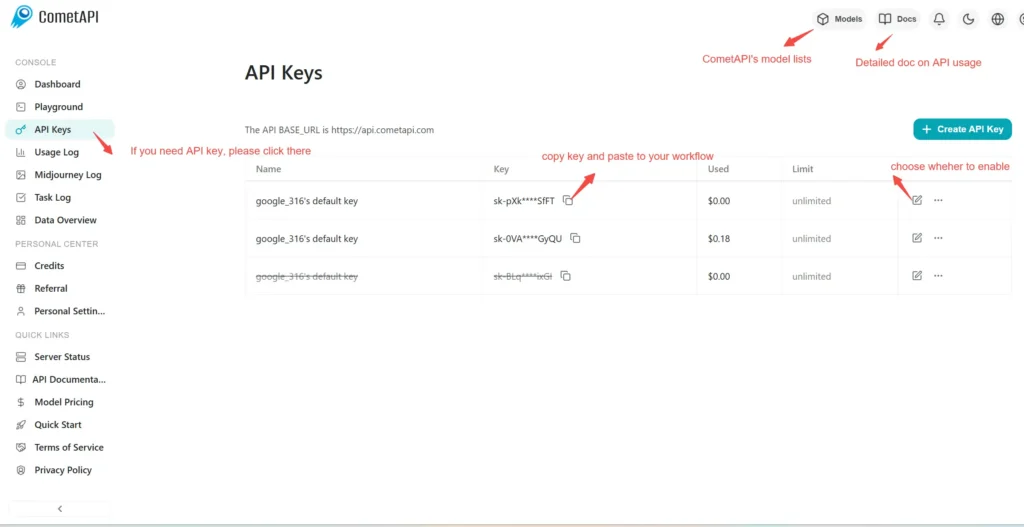
Step 1: Sign Up for API Key
Log in to cometapi.com. If you are not our user yet, please register first. Sign into your CometAPI console. Get the access credential API key of the interface. Click “Add Token” at the API token in the personal center, get the token key: sk-xxxxx and submit.
Step 2: Send Requests to Veo 3.1 fast API
Select the “\veo3.1-fast \” endpoint to send the API request and set the request body. The request method and request body are obtained from our website API doc. Our website also provides Apifox test for your convenience. Replace <YOUR_API_KEY> with your actual CometAPI key from your account. base url is Veo3 Async Generation(https://api.cometapi.com/v1/videos).
Insert your question or request into the content field—this is what the model will respond to . Process the API response to get the generated answer.
Step 3: Retrieve and Verify Results
Process the API response to get the generated answer. After processing, the API responds with the task status and output data.
To learn more about Veo3.1, please see the Veo3.1 page.